I’m starting to work on deploying Nextcloud on Kubernetes, which should eventually replace my existing setup. I’ve been running Nextcloud using the official Snap package for years, and overall it has worked well. The main issue, however, is performance – it’s been quite slow at times. On top of that, I’m paying for a dedicated VM just to run it, which doesn’t feel very efficient anymore.
So, it’s time to move it into my Kubernetes cluster.
In Part 1, I’ll focus on setting up the core components – the database, NGINX, and the basic pieces needed just to get the service up and running. Later on, I’ll start adding the more advanced stuff: Redis, scaling with multiple pods, and some extra security improvements.
I might also experiment with a Helm-based approach at some point, but for now, I want to build everything from scratch to better understand how it all fits together.
docker hub official: https://hub.docker.com/_/nextcloud
My choice of image: 33-fpm. 33-fpm will always use version 33, This automatically tracks the latest 33.x release (e.g. 33.0.1, 33.0.2, etc.), so I don’t have to manually bump patch versions.
nginx:lates because FPM need reverse proxy
mariadb:11.8 – will be my database
My first attempt with installation is to basically convert the official docker compose file to Kubernetes. Redis later:). I will use sidecar container for reverse proxy + FPM.
services:
  # Note: MariaDB is an external service. You can find more information about the configuration here:
  # https://hub.docker.com/_/mariadb
  db:
    # Note: Check the recommend version here: https://docs.nextcloud.com/server/latest/admin_manual/installation/system_requirements.html#server
    image: mariadb:lts
    restart: always
    command: --transaction-isolation=READ-COMMITTED
    volumes:
      - db:/var/lib/mysql
    environment:
      - MYSQL_ROOT_PASSWORD=
      - MYSQL_PASSWORD=
      - MYSQL_DATABASE=nextcloud
      - MYSQL_USER=nextcloud

  # Note: Redis is an external service. You can find more information about the configuration here:
  # https://hub.docker.com/_/redis
  redis:
    image: redis:alpine
    restart: always

  app:
    image: nextcloud:fpm
    restart: always
    depends_on:
      - redis
      - db
    volumes:
      - nextcloud:/var/www/html
    environment:
      - MYSQL_PASSWORD=
      - MYSQL_DATABASE=nextcloud
      - MYSQL_USER=nextcloud
      - MYSQL_HOST=db

  # Note: Nginx is an external service. You can find more information about the configuration here:
  # https://hub.docker.com/_/nginx/
  web:
    image: nginx:alpine-slim
    restart: always
    ports:
      - 8080:80
    depends_on:
      - app
    volumes:
      # https://docs.nextcloud.com/server/latest/admin_manual/installation/nginx.html
      - ./nginx.conf:/etc/nginx/nginx.conf:ro
    volumes_from:
      - app

volumes:
  nextcloud:
db:My setup notes with docker containers only. It is easier for me to structure it that way
Create network: docker network create nextcloud-net

docker run -d \
  --name nextcloud-db \
  --network nextcloud-net \
  --restart always \
  -e MYSQL_ROOT_PASSWORD=password \
  -e MYSQL_PASSWORD=password \
  -e MYSQL_DATABASE=nextcloud \
  -e MYSQL_USER=nextcloud \
  -v db:/var/lib/mysql \
  mariadb:11.8 \
  --transaction-isolation=READ-COMMITTED --log-bin=binlog --binlog-format=ROW

Test DB:
docker exec -it nextcloud-db mariadb -u root -p
SHOW DATABASES;


Docker run command for Nextcloud FPM
docker run -d \
  --name nextcloud-app \
  --network nextcloud-net \
  --restart always \
  -v nextcloud:/var/www/html \
  -e MYSQL_PASSWORD=password \
  -e MYSQL_DATABASE=nextcloud \
  -e MYSQL_USER=nextcloud \
  -e MYSQL_HOST=nextcloud-db \
  nextcloud:33-fpm

Reverse proxy:

docker run -d \
  --name nextcloud-web \
  --network nextcloud-net \
  --restart always \
  -p 8080:8080 \
  -v /full/path/to/nginx.conf:/etc/nginx/nginx.conf:ro \
  -v nextcloud:/var/www/html \
  nginx

volumes_from:
  - app
This means mount all volumes from the app container into this container.In your case, it will mount the same /var/www/html volume from the Nextcloud FPM container, so Nginx can serve the same files.
Create namespace.
kubectl create namespace nextcloudStarting with database. Secrets first. secret-database-nextcloud.yaml
apiVersion: v1
kind: Secret
metadata:
  name: secret-db-nextcloud
  namespace: nextcloud
stringData:                    # ← Using stringData so you don't have to base64 encode
  MYSQL_ROOT_PASSWORD: "password"
  MYSQL_PASSWORD: "password"
  MYSQL_DATABASE: "nextcloud"
  MYSQL_USER: "nextcloud"
  MYSQL_HOST: "mariadb-nextcloud-service.nextcloud.svc.cluster.local"
kubectl apply -f secret-database-nextcloud.yamlDeploy database statefulset-db-nextcloud.yaml
apiVersion: v1
kind: Service
metadata:
  name: mariadb-nextcloud-service
  namespace: nextcloud
  labels:
    db: nextcloud
spec:
  clusterIP: None
  ports:
  - port: 3306
    name: mariadbport
  selector:
    db: nextcloud
---
apiVersion: apps/v1
kind: StatefulSet
metadata:
  name: mariadb-nextcloud-statefulset
  namespace: nextcloud
spec:
  selector:
    matchLabels:
      db: nextcloud # has to match .spec.template.metadata.labels
  serviceName: "mariadb-nextcloud-service"
  replicas: 1
  minReadySeconds: 0 # the Pod will be considered available as soon as it is ready
  template:
    metadata:
      labels:
        db: nextcloud # has to match .spec.selector.matchLabels
    spec:
      terminationGracePeriodSeconds: 10 ## check https://kubernetes.io/docs/tasks/run-application/force-delete-stateful-set-pod/
      containers:
      - name: mariadb
        image: mariadb:11.8
        env:
          - name: MYSQL_DATABASE
            valueFrom:
              secretKeyRef:
                name: secret-db-nextcloud
                key: MYSQL_DATABASE
          - name: MYSQL_USER
            valueFrom:
              secretKeyRef:
                name: secret-db-nextcloud
                key: MYSQL_USER
          - name: MYSQL_ROOT_PASSWORD
            valueFrom:
              secretKeyRef:
                name: secret-db-nextcloud
                key: MYSQL_ROOT_PASSWORD
          - name: MYSQL_PASSWORD
            valueFrom:
              secretKeyRef:
                name: secret-db-nextcloud
                key: MYSQL_PASSWORD
        ports:
        - containerPort: 3306
          name: mariadbport
        resources:
          requests:
            memory: "512Mi"
            cpu: "250m"
          limits:
            memory: "1Gi"
            cpu: "1000m"
        volumeMounts:
        - name: mariadb-nextcloud-pvc
          mountPath: /var/lib/mysql
  volumeClaimTemplates:  ### << No need to create PVC manualy. If replicas is always 1, data is safe. If replaca is 2, it will create new pvc
  - metadata:
      name: mariadb-nextcloud-pvc
    spec:
      accessModes: [ "ReadWriteOnce" ]
      storageClassName: "nfs-dynamic"
      resources:
        requests:
          storage: 3Gi
kubectl apply -f statefulset-db-nextcloud.yamlUseful command to test db
kubectl -n nextcloud run mariadb-client --rm -it \
  --image=mariadb:11 \
  --restart=Never -- bash


mariadb -h mariadb-nextcloud-service.nextcloud.svc.cluster.local -u root -pPrepare persistent volume for nextcloud fpm pvc-for-nextcloud-fpm.yaml
apiVersion: v1
kind: PersistentVolumeClaim
metadata:
  namespace: nextcloud
  name: nextcloud-pvc
spec:
  accessModes:
    - ReadWriteMany  #the volume can be mounted as read-write by many nodes.
                    # https://kubernetes.io/docs/concepts/storage/persistent-volumes/#access-modes
  resources:
    requests:
storage: 10GiConfigmap is needed for nginx config. configmap-nginx.yaml
apiVersion: v1
kind: ConfigMap
metadata:
  name: configmap-nginx-nextcloud
  namespace: nextcloud
data:
  default.conf: |
    server {
        listen 80;
        server_name localhost;

        root /var/www/html;
        index index.php index.html /index.php;

        client_max_body_size 10G;

        location / {
            try_files $uri $uri/ /index.php$request_uri;
        }

        location ~ ^/(?:build|tests|config|lib|3rdparty|templates|data)/ {
            deny all;
        }

        location ~ \.php(?:$|/) {
            fastcgi_split_path_info ^(.+\.php)(/.+)$;
            fastcgi_pass 127.0.0.1:9000;
            fastcgi_index index.php;
            include fastcgi_params;
            fastcgi_param SCRIPT_FILENAME $document_root$fastcgi_script_name;
            fastcgi_param PATH_INFO $fastcgi_path_info;
        }

        location ~ /\.ht {
            deny all;
        }
    }
kubectl apply -f configmap-nginx.yamlDeployment on nextcloud. It will be improved in future with livenessProbe, readinessProbe, etc. For now you must know that it takes time for install to complete. Expect 502 in first 10 minutes after deployment.
nextcloud-deployment.yaml
apiVersion: apps/v1
kind: Deployment
metadata:
  name: nextcloud-deployment
  namespace: nextcloud
spec:
  replicas: 1
  selector:
    matchLabels:
      app: nextcloud
  template:
    metadata:
      labels:
        app: nextcloud
    spec:
      # ── Containers ──
      containers:

      # Container 1: Nextcloud FPM
      - name: nextcloud-fpm
        image: nextcloud:33-fpm
        ports:
        - containerPort: 9000
          name: fpm
        env:
          - name: MYSQL_PASSWORD
            valueFrom:
              secretKeyRef:
                name: secret-db-nextcloud
                key: MYSQL_PASSWORD
          - name: MYSQL_DATABASE
            valueFrom:
              secretKeyRef:
                name: secret-db-nextcloud
                key: MYSQL_DATABASE
          - name: MYSQL_USER
            valueFrom:
              secretKeyRef:
                name: secret-db-nextcloud
                key: MYSQL_USER
          - name: MYSQL_HOST
            valueFrom:
              secretKeyRef:
                name: secret-db-nextcloud
                key: MYSQL_HOST
        resources:
          requests:
            memory: "512Mi"
            cpu: "1000m"
          limits:
            memory: "2Gi"
            cpu: "2000m"
        volumeMounts:
        - name: nextcloud-pvc
          mountPath: /var/www/html

      # Container 2: Nginx sidecar
      - name: nginx
        image: nginx:latest
        ports:
        - containerPort: 80
          name: http
        volumeMounts:
        - name: nextcloud-pvc
          mountPath: /var/www/html
          readOnly: true
        - name: nginx-conf
          mountPath: /etc/nginx/conf.d/default.conf
          subPath: default.conf
        resources:
          requests:
            memory: "64Mi"
            cpu: "50m"
          limits:
            memory: "128Mi"
            cpu: "250m"

      # ── Volumes ──
      volumes:
      - name: nextcloud-pvc
        persistentVolumeClaim:
          claimName: nextcloud-pvc
      - name: nginx-conf
        configMap:
          name: configmap-nginx-nextcloud
kubectl apply -f nextcloud-deployment.yamlCreate a service service-nextcloud.yaml
apiVersion: v1
kind: Service
metadata:
  name: nextcloud-service
  namespace: nextcloud
  labels:
    app: nextcloud
spec:
  ports:
  - port: 80
    targetPort: 80
    name: http
  selector:
    app: nextcloud
kubectl apply -f service-nextcloud.yamlIngress in order to expose it to internet
apiVersion: networking.k8s.io/v1
kind: Ingress
metadata:
  name: nextcloud-ingress
  namespace: nextcloud
  annotations:
    cert-manager.io/cluster-issuer: letsencrypt-prod
    nginx.ingress.kubernetes.io/ssl-redirect: "true"
spec:
  ingressClassName: nginx
  rules:
  - host: yourdomain.com
    http:
      paths:
      - backend:
          service:
            name: nextcloud-service
            port:
              number: 80
        path: /
        pathType: Prefix
  tls:
  - hosts:
    - yourdomain.com
    secretName: nextcloud-tls
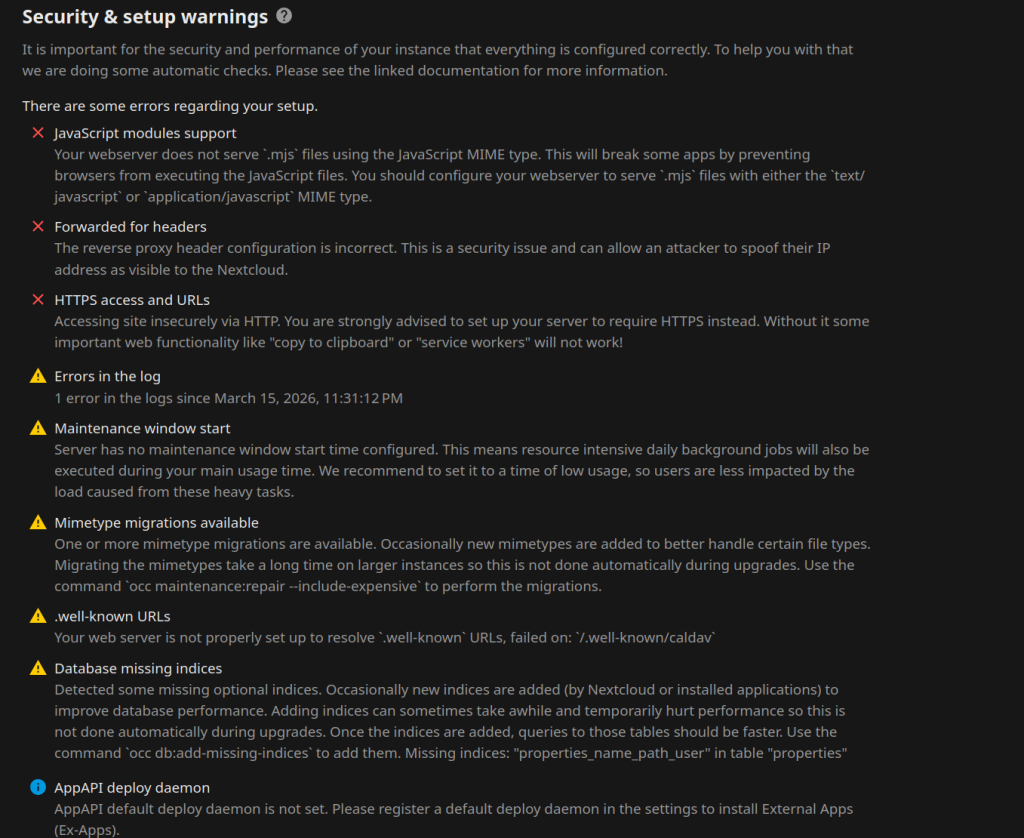
Visit your domain and create admin user. It will take some time ~10 minutes for page to load. Do not surprise from 502 error. Issue will be fixed in part2.
Still a lot of work needs to be done