Kimai is an open-source time tracking platform designed for project-based work. It is built with Symfony and relies on a MySQL database for persistent storage, making it a solid candidate for deployment in a Kubernetes environment.
In a previous deployment of WordPress, I did not define resource requests and limits for my pods, which led to node resource exhaustion and instability. This time, I will explicitly configure resource constraints to avoid similar issues.
Before moving to Kubernetes manifests, I performed an initial installation on a Debian Trixie server to better understand the application’s structure and runtime requirements.
Key Components
Kimai has a fairly standard PHP application layout:
- Uses the Symfony framework with dependency management via Composer
- Logs and cache are stored in the
var/directory - The web server (Nginx) serves content from the
public/directory, which contains static assets such as images and CSS files - Persistent application data is stored in a MySQL database
Initial Setup Commands
To install Kimai:
bin/console kimai:install -nTo create the initial admin user:
bin/console kimai:user:create username youmail@example.com ROLE_SUPER_ADMINContainerization Strategy
Before creating Kubernetes manifests, it is important to select appropriate container images. The official Kimai documentation provides environment configuration examples, but notes that PHP-FPM images are considered deprecated in their standard setup, while the Apache-based image is simpler to deploy. However, this setup is not intended for production. Instead, I will deliberately use a PHP-FPM-based approach to explore best practices, including the use of sidecar containers. It is worth noting that the combination of Nginx and PHP-FPM remains a widely adopted standard in the PHP ecosystem, offering better performance and flexibility compared to Apache with mod_php.
Selected Container Images
- Reverse proxy (sidecar container):
nginx:1.29-alpine - Application container:
kimai/kimai2:fpm-2.46.0 - Utility container (for auxiliary tasks):
busybox:1.37
Kubernetes deployment strategy
Everything is deployed in namespace prod. Database is first, Kimai and it components second. Credentials in secrets.
I will start with mysql statefull. Create secret and statefullset. In statefull set I implemented resources limits, startupProbe, livenessProbe readinessProbe. Is is exposed via service.
Kubernetes Deployment Strategy
All resources are deployed within a dedicated prod namespace to ensure logical isolation and better resource management.
The deployment is structured in the following order:
- Database layer (MySQL)
- Application layer (Kimai and supporting containers)
Sensitive data such as database credentials is stored securely using Kubernetes Secrets.
MySQL Stateful Overview
The database is deployed as a Stateful workload using a Kubernetes StatefulSet, which provides stable network identities and persistent storage—both critical for database systems.
The setup includes:
- A Secret for credentials
- A StatefulSet for the MySQL instance
- A Service for internal cluster exposure
Resource Management
Unlike my previous deployment, I explicitly define resource requests and limits for the MySQL container. This prevents resource contention and protects cluster nodes from exhaustion, ensuring more predictable scheduling and stability.
Health Probes: Why They Matter
To improve reliability and self-healing behavior, I configured three types of probes:
startupProbe
The startupProbe is used to determine when the container has successfully started. This is especially important for MySQL, which may take time to initialize (e.g., during first-time database creation or recovery). Without a startup probe, Kubernetes might incorrectly assume the container is unhealthy and restart it prematurely.
Key benefit: Prevents unnecessary restarts during slow initialization phases.
livenessProbe
The livenessProbe checks whether the application is still running correctly. If this probe fails, Kubernetes will restart the container. For a database, this helps recover from situations such as deadlocks, crashes, or unresponsive states.
Key benefit: Enables automatic recovery from application hangs or failures.
readinessProbe
The readinessProbe determines whether the container is ready to accept traffic. Even if MySQL is running, it may not yet be ready to serve queries (e.g., during startup or replication sync). Until the readiness probe passes, the pod will not receive traffic from Services.
Key benefit: Prevents routing traffic to a database that is not yet ready.
Service Exposure
The MySQL StatefulSet is exposed internally via a Kubernetes Service, allowing other components (such as Kimai) to connect using a stable DNS name.
MySQL Deployment
mysql-kimai-secret.yaml. Do not forget to encode your credentials
## encode base64 command: echo -n "password123" | base64 -i -
apiVersion: v1
kind: Secret
metadata:
  name: secret-mysql-kimai
  namespace: prod
data:
  MYSQL_DATABASE: base64encoded
  MYSQL_USER: base64encoded
  MYSQL_ROOT_PASSWORD: base64encoded
MYSQL_PASSWORD: base64encodedkubectl apply -f mysql-kimai-secret.yamlmysql-kimai-statefulset.yaml
apiVersion: v1
kind: Service
metadata:
  name: mysql-kimai-service
  namespace: prod
  labels:
    db: mysqlkimai
spec:
  clusterIP: None
  ports:
  - port: 3306
    name: mysql-kimai
  selector:
    db: mysqlkimai
---
apiVersion: apps/v1
kind: StatefulSet
metadata:
  name: mysql-kimai-statefulset
  namespace: prod
spec:
  selector:
    matchLabels:
      db: mysqlkimai # has to match .spec.template.metadata.labels
  serviceName: "mysql-kimai-service"
  replicas: 1
  minReadySeconds: 0 # the Pod will be considered available as soon as it is ready
  template:
    metadata:
      labels:
        db: mysqlkimai # has to match .spec.selector.matchLabels
    spec:
      terminationGracePeriodSeconds: 10 ## check https://kubernetes.io/docs/tasks/run-application/force-delete-stateful-set-pod/
      containers:
      - name: mysql
        image: mysql:8.4.8
        env:
          - name: MYSQL_DATABASE
            valueFrom:
              secretKeyRef:
                name: secret-mysql-kimai
                key: MYSQL_DATABASE
          - name: MYSQL_USER
            valueFrom:
              secretKeyRef:
                name: secret-mysql-kimai
                key: MYSQL_USER
          - name: MYSQL_ROOT_PASSWORD
            valueFrom:
              secretKeyRef:
                name: secret-mysql-kimai
                key: MYSQL_ROOT_PASSWORD
          - name: MYSQL_PASSWORD
            valueFrom:
              secretKeyRef:
                name: secret-mysql-kimai
                key: MYSQL_PASSWORD
        ports:
        - containerPort: 3306
          name: mysql-kimai
        resources:
          requests:
            memory: "512Mi"
            cpu: "250m"
          limits:
            memory: "1Gi"
            cpu: "1000m"
        ## startupProbe runs FIRST — liveness & readiness are disabled until this succeeds
        ## Allows up to 10s + (30 × 10s) = ~310s for MySQL to fully initialize
        startupProbe:
          exec:
            command:
              - mysqladmin
              - ping
              - -h
              - localhost
          initialDelaySeconds: 10
          periodSeconds: 10
          timeoutSeconds: 5
          failureThreshold: 30
        livenessProbe:
          exec:
            command:
              - mysqladmin
              - ping
              - -h
              - localhost
          initialDelaySeconds: 10
          periodSeconds: 10
          timeoutSeconds: 5
          failureThreshold: 3
        readinessProbe:
          exec:
            command:
              - mysqladmin
              - ping
              - -h
              - localhost
          initialDelaySeconds: 5
          periodSeconds: 5
          timeoutSeconds: 3
          failureThreshold: 3
        volumeMounts:
        - name: mysql-kimai-pvc
          mountPath: /var/lib/mysql
  volumeClaimTemplates:  ### << No need to create PVC manualy. If replicas is always 1, data is safe. If replaca is 2, it will create new pvc
  - metadata:
      name: mysql-kimai-pvc
    spec:
      accessModes: [ "ReadWriteOnce" ]
      storageClassName: "nfs-dynamic"
      resources:
        requests:
storage: 3GiKimai Deployment
Manifest files first. Copy-paste in this order. I will explain everything in details later:)
kimai-secret.yaml
apiVersion: v1
kind: Secret
metadata:
  name: secret-kimai
  namespace: prod
stringData:                    # ← Using stringData so you don't have to base64 encode
  DATABASE_URL: "mysql://user:password@mysql-kimai-service.prod.svc.cluster.local:3306/kimaidb?charset=utf8mb4&serverVersion=8.4.8"
  KIMAI_ADMIN_PASSWORD: "password"
  APP_SECRET: "generaterandomstringforsymfony"
kubectl apply -f kimai-secret.yamlkimai-configmap.yaml
apiVersion: v1
kind: ConfigMap
metadata:
  name: configmap-kimai
  namespace: prod
data:
  KIMAI_ADMIN_EMAIL: "yourmail@example.com"
  TRUSTED_PROXIES: "0.0.0.0/0"
kubectl apply -f kimai-configmap.yamlkimai-logs-pvc.yaml
# PVC for Kimai Symfony application logs
# Stores logs from /opt/kimai/var/log/ for all replicas
# Each pod writes to its own subdirectory via subPathExpr
apiVersion: v1
kind: PersistentVolumeClaim
metadata:
  name: kimai-logs-pvc
  namespace: prod
spec:
  accessModes:
    - ReadWriteMany          # Multiple pods need to write simultaneously
  storageClassName: nfs-dynamic
  resources:
    requests:
      storage: 1Gi
---
# PVC for Nginx access and error logs
# Each pod writes to its own subdirectory via subPathExpr
apiVersion: v1
kind: PersistentVolumeClaim
metadata:
  name: nginx-logs-pvc
  namespace: prod
spec:
  accessModes:
    - ReadWriteMany
  storageClassName: nfs-dynamic
  resources:
    requests:
      storage: 1Gi
kubectl apply -f kimai-logs-pvc.yamlconfigmap-nginx-kimai.yaml
apiVersion: v1
kind: ConfigMap
metadata:
  name: configmap-nginx-kimai
  namespace: prod
data:
  default.conf: |
    server {
        listen 80;
        server_name _;
        root /var/www/public;
        index index.php;

        location / {
            try_files $uri /index.php$is_args$args;
        }

        location ~ ^/index\.php(/|$) {
            fastcgi_pass 127.0.0.1:9000;
            fastcgi_split_path_info ^(.+\.php)(/.*)$;
            include fastcgi_params;
            fastcgi_param SCRIPT_FILENAME /opt/kimai/public$fastcgi_script_name;
            fastcgi_param DOCUMENT_ROOT /opt/kimai/public;
            internal;
        }

        location ~ \.php$ {
            return 404;
        }
    }
kubectl apply -f configmap-nginx-kimai.yamlkimai-deployment.yaml
apiVersion: apps/v1
kind: Deployment
metadata:
  name: kimai-deployment
  namespace: prod
spec:
  replicas: 2
  selector:
    matchLabels:
      app: kimai
  template:
    metadata:
      labels:
        app: kimai
    spec:

      # ── Init Containers ──
      initContainers:

      # Init Container 1: Wait for MySQL to accept connections on port 3306.
      - name: wait-for-mysql
        image: busybox:1.37
        command:
          - sh
          - -c
          - |
            echo "Waiting for MySQL at mysql-kimai-service:3306..."
            until nc -z mysql-kimai-service 3306; do
              echo "MySQL not ready yet, retrying in 5s..."
              sleep 5
            done
            echo "MySQL is accepting connections!"
        resources:
          requests:
            memory: "16Mi"
            cpu: "10m"
          limits:
            memory: "32Mi"
            cpu: "50m"

      # Init Container 2: Copy Kimai static files to shared volume for Nginx.
      - name: copy-public-files
        image: kimai/kimai2:fpm-2.46.0
        command: ["sh", "-c", "cp -r /opt/kimai/public/* /shared-public/"]
        volumeMounts:
        - name: public-files
          mountPath: /shared-public

      # Init Container 3: Create a per-pod log directory on the shared PVC.
      # Uses the Downward API pod name so each replica writes to its own folder,
      # preventing log interleaving between replicas.
      # Result: /var/log/kimai/kimai-deployment-xxxxx-yyyyy/
      - name: init-log-dir
        image: busybox:1.37
        command:
          - sh
          - -c
          - |
            mkdir -p /shared-logs/${POD_NAME}
            # Kimai FPM runs as www-data (UID 82 in Alpine)
            chown -R 82:82 /shared-logs/${POD_NAME}
            echo "Log directory /shared-logs/${POD_NAME} ready"
        env:
          - name: POD_NAME
            valueFrom:
              fieldRef:
                fieldPath: metadata.name
        volumeMounts:
        - name: kimai-logs
          mountPath: /shared-logs
        resources:
          requests:
            memory: "16Mi"
            cpu: "10m"
          limits:
            memory: "32Mi"
            cpu: "50m"

      # ── Containers ──
      containers:

      # Container 1: Kimai FPM
      - name: kimai
        image: kimai/kimai2:fpm-2.46.0
        ports:
        - containerPort: 9000
          name: fpm
        env:
          - name: DATABASE_URL
            valueFrom:
              secretKeyRef:
                name: secret-kimai
                key: DATABASE_URL
          - name: ADMINPASS
            valueFrom:
              secretKeyRef:
                name: secret-kimai
                key: KIMAI_ADMIN_PASSWORD
          - name: APP_SECRET
            valueFrom:
              secretKeyRef:
                name: secret-kimai
                key: APP_SECRET
          - name: ADMINMAIL
            valueFrom:
              configMapKeyRef:
                name: configmap-kimai
                key: KIMAI_ADMIN_EMAIL
          - name: TRUSTED_PROXIES
            valueFrom:
              configMapKeyRef:
                name: configmap-kimai
                key: TRUSTED_PROXIES
          # Downward API — injects the pod name so we can use it in the
          # log symlink below
          - name: POD_NAME
            valueFrom:
              fieldRef:
                fieldPath: metadata.name
        resources:
          requests:
            memory: "256Mi"
            cpu: "250m"
          limits:
            memory: "512Mi"
            cpu: "1000m"
        startupProbe:
          tcpSocket:
            port: 9000
          initialDelaySeconds: 10
          periodSeconds: 10
          timeoutSeconds: 3
          failureThreshold: 30
        readinessProbe:
          tcpSocket:
            port: 9000
          initialDelaySeconds: 5
          periodSeconds: 5
          timeoutSeconds: 3
          failureThreshold: 3
        livenessProbe:
          tcpSocket:
            port: 9000
          initialDelaySeconds: 5
          periodSeconds: 10
          timeoutSeconds: 5
          failureThreshold: 3
        volumeMounts:
        - name: public-files
          mountPath: /opt/kimai/public-shared
        # Mount the per-pod subdirectory directly as Kimai's log directory.
        # subPathExpr uses the POD_NAME env var so each replica gets its own folder.
        # Symfony/Kimai writes logs to /opt/kimai/var/log/ — this persists them to NFS.
        - name: kimai-logs
          mountPath: /opt/kimai/var/log
          subPathExpr: $(POD_NAME)

      # Container 2: Nginx sidecar
      - name: nginx
        image: nginx:1.29-alpine
        ports:
        - containerPort: 80
          name: http
        volumeMounts:
        - name: public-files
          mountPath: /var/www/public
          readOnly: true
        - name: nginx-conf
          mountPath: /etc/nginx/conf.d
          readOnly: true
        # Persist Nginx access/error logs to a per-pod subdirectory too.
        # Nginx logs go to /var/log/nginx/ by default.
        - name: nginx-logs
          mountPath: /var/log/nginx
          subPathExpr: $(POD_NAME)
        env:
          - name: POD_NAME
            valueFrom:
              fieldRef:
                fieldPath: metadata.name
        resources:
          requests:
            memory: "64Mi"
            cpu: "50m"
          limits:
            memory: "128Mi"
            cpu: "250m"

      # ── Volumes ──
      volumes:
      - name: public-files
        emptyDir: {}
      - name: nginx-conf
        configMap:
          name: configmap-nginx-kimai
      # Persistent volume for Kimai Symfony logs (/opt/kimai/var/log)
      # Survives pod restarts and deletions
      - name: kimai-logs
        persistentVolumeClaim:
          claimName: kimai-logs-pvc
      # Persistent volume for Nginx access/error logs
      - name: nginx-logs
        persistentVolumeClaim:
          claimName: nginx-logs-pvc
kubectl apply -f kimai-deployment.yamlkimai-service.yaml
apiVersion: v1
kind: Service
metadata:
  name: kimai-service
  namespace: prod
  labels:
    app: kimai
spec:
  ports:
  - port: 80
    targetPort: 80
    name: http
  selector:
    app: kimai
kubectl apply -f kimai-service.yamlkimai-ingress.yaml
apiVersion: networking.k8s.io/v1
kind: Ingress
metadata:
  name: kimai-ingress
  namespace: prod
  annotations:
    cert-manager.io/cluster-issuer: letsencrypt-prod
    nginx.ingress.kubernetes.io/ssl-redirect: "true"
spec:
  ingressClassName: nginx
  rules:
  - host: yourdomain.com
    http:
      paths:
      - backend:
          service:
            name: kimai-service
            port:
              number: 80
        path: /
        pathType: Prefix
  tls:
  - hosts:
    - yourdomain.com
secretName: kimai-tlskubectl apply -f kimai-ingress.yamlkimai-log-rotation-cronjob.yaml Cronjob for log rotation, because storing credentials on pvc is not ideal, but in this case it just works. The pain comes when you need to grep something inside 🙂
apiVersion: batch/v1
kind: CronJob
metadata:
  name: kimai-log-rotation
  namespace: prod
spec:
  # Run every day at 2:00 AM
  schedule: "0 2 * * *"
  # If the previous job is still running, skip this execution
  concurrencyPolicy: Forbid
  # Keep last 3 successful and 1 failed job for debugging
  successfulJobsHistoryLimit: 3
  failedJobsHistoryLimit: 1
  jobTemplate:
    spec:
      # If the job hangs, kill it after 10 minutes
      activeDeadlineSeconds: 600
      template:
        spec:
          restartPolicy: OnFailure
          containers:

          # ── Kimai Symfony logs rotation ──
          - name: rotate-kimai-logs
            image: busybox:1.37
            command:
              - sh
              - -c
              - |
                echo "=== Kimai log rotation started at $(date) ==="

                LOG_DIR="/logs/kimai"
                MAX_AGE_DAYS=30

                # Step 1: Delete compressed archives older than 30 days
                echo "Deleting archives older than ${MAX_AGE_DAYS} days..."
                find ${LOG_DIR} -name "*.tar.gz" -mtime +${MAX_AGE_DAYS} -print -delete

                # Step 2: Delete raw log files older than 30 days (safety net)
                echo "Deleting raw logs older than ${MAX_AGE_DAYS} days..."
                find ${LOG_DIR} -name "*.log" -mtime +${MAX_AGE_DAYS} -print -delete

                # Step 3: Compress log files older than 1 day that haven't
                # been compressed yet. Each file gets its own dated archive.
                echo "Compressing logs older than 1 day..."
                find ${LOG_DIR} -name "*.log" -mtime +1 -print | while read FILE; do
                  # Create archive name: original.log → original-2026-03-19.tar.gz
                  DIR=$(dirname "${FILE}")
                  BASE=$(basename "${FILE}" .log)
                  DATE=$(date -r "${FILE}" +%Y-%m-%d)
                  ARCHIVE="${DIR}/${BASE}-${DATE}.tar.gz"

                  echo "Compressing: ${FILE} → ${ARCHIVE}"
                  tar -czf "${ARCHIVE}" -C "${DIR}" "$(basename ${FILE})"

                  # Only delete original if compression succeeded
                  if [ $? -eq 0 ]; then
                    rm -f "${FILE}"
                    echo "Removed original: ${FILE}"
                  else
                    echo "ERROR: Compression failed for ${FILE}, keeping original"
                  fi
                done

                # Step 4: Show what's left
                echo ""
                echo "=== Current log storage usage ==="
                du -sh ${LOG_DIR}/*/
                echo ""
                echo "=== Rotation completed at $(date) ==="
            volumeMounts:
            - name: kimai-logs
              mountPath: /logs/kimai

          # ── Nginx logs rotation ──
          - name: rotate-nginx-logs
            image: busybox:1.37
            command:
              - sh
              - -c
              - |
                echo "=== Nginx log rotation started at $(date) ==="

                LOG_DIR="/logs/nginx"
                MAX_AGE_DAYS=30

                # Step 1: Delete compressed archives older than 30 days
                echo "Deleting archives older than ${MAX_AGE_DAYS} days..."
                find ${LOG_DIR} -name "*.tar.gz" -mtime +${MAX_AGE_DAYS} -print -delete

                # Step 2: Delete raw log files older than 30 days
                echo "Deleting raw logs older than ${MAX_AGE_DAYS} days..."
                find ${LOG_DIR} -name "*.log" -mtime +${MAX_AGE_DAYS} -print -delete

                # Step 3: Compress log files older than 1 day
                echo "Compressing logs older than 1 day..."
                find ${LOG_DIR} -name "*.log" -mtime +1 -print | while read FILE; do
                  DIR=$(dirname "${FILE}")
                  BASE=$(basename "${FILE}" .log)
                  DATE=$(date -r "${FILE}" +%Y-%m-%d)
                  ARCHIVE="${DIR}/${BASE}-${DATE}.tar.gz"

                  echo "Compressing: ${FILE} → ${ARCHIVE}"
                  tar -czf "${ARCHIVE}" -C "${DIR}" "$(basename ${FILE})"

                  if [ $? -eq 0 ]; then
                    rm -f "${FILE}"
                    echo "Removed original: ${FILE}"
                  else
                    echo "ERROR: Compression failed for ${FILE}, keeping original"
                  fi
                done

                # Step 4: Show usage
                echo ""
                echo "=== Current log storage usage ==="
                du -sh ${LOG_DIR}/*/
                echo ""
                echo "=== Rotation completed at $(date) ==="
            volumeMounts:
            - name: nginx-logs
              mountPath: /logs/nginx

          # ── Mount the same PVCs used by the Kimai deployment ──
          volumes:
          - name: kimai-logs
            persistentVolumeClaim:
              claimName: kimai-logs-pvc
          - name: nginx-logs
            persistentVolumeClaim:
              claimName: nginx-logs-pvc
kubectl apply -f kimai-log-rotation-cronjob.yamlDeployment Overview
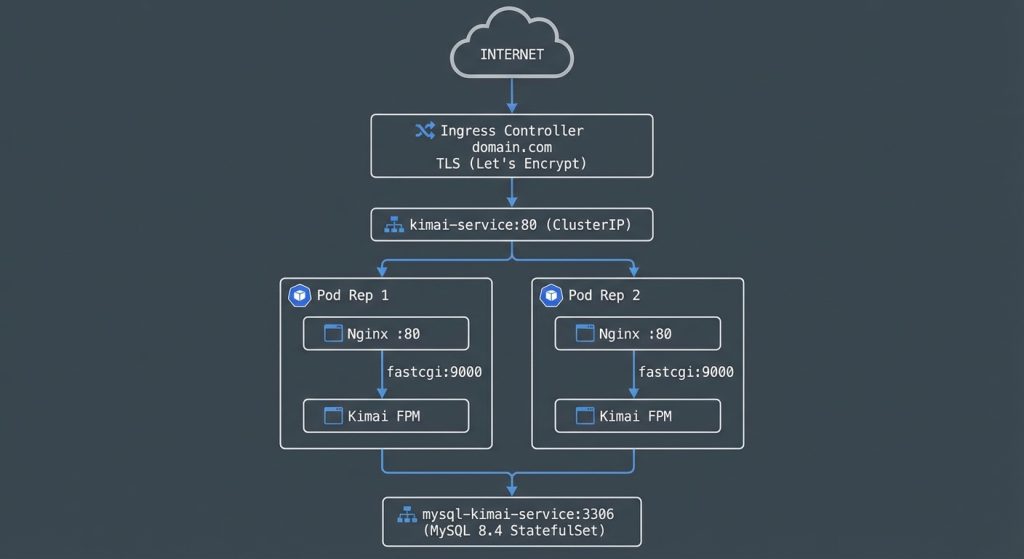
This Kimai deployment runs as a multi-container pod architecture on Kubernetes, with 2 replicas for high availability. The application is split across several Kubernetes resources that work together to serve a production-ready time-tracking application
The Sidecar Container Pattern (Nginx + PHP-FPM)
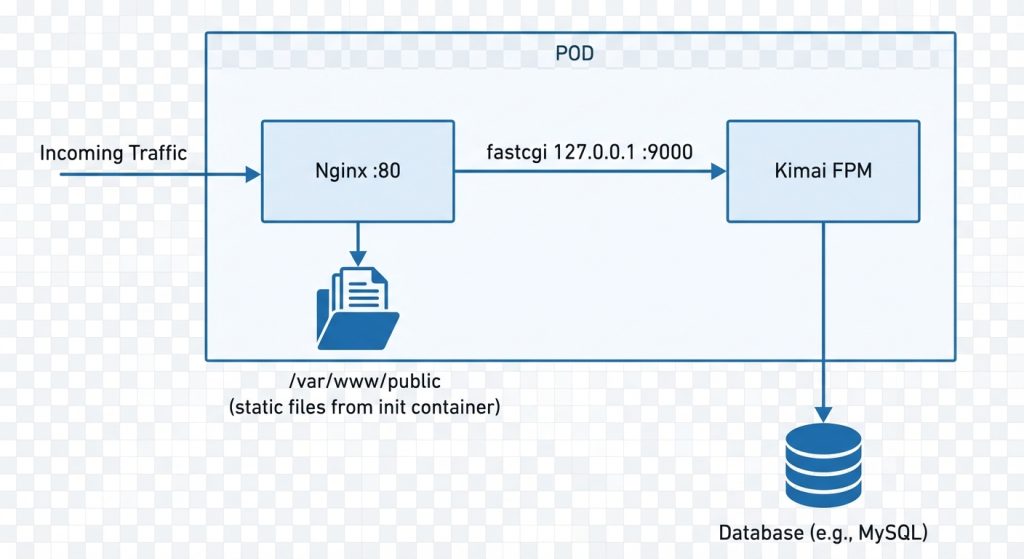
Kimai uses the FPM (FastCGI Process Manager) variant of its Docker image, which means PHP doesn’t serve HTTP directly – it needs a web server in front of it. Instead of deploying Nginx as a separate pod/service, this setup uses the sidecar pattern: both containers live in the same pod.
Why sidecar?
Since both containers share the same pod, they share the same network namespace. Nginx reaches PHP-FPM via 127.0.0.1:9000 (localhost) – no network hops, no service discovery, minimal latency.
How static files are shared
Kimai’s static assets (CSS, JS, images) live inside the Kimai FPM image at /opt/kimai/public/. Nginx needs access to these files to serve them directly without hitting PHP. An init container copies them to a shared emptyDir volume before either main container starts:
initContainers:
- name: copy-public-files
  image: kimai/kimai2:fpm-2.46.0
command: ["sh", "-c", "cp -r /opt/kimai/public/* /shared-public/"]The Nginx configuration then uses two different document roots:
- Nginx serves static files from
/var/www/public(the shared volume) - PHP requests are forwarded to FPM with
SCRIPT_FILENAMEpointing to/opt/kimai/public(the path inside the FPM container)
root /var/www/public;          # Nginx's static file root

location ~ ^/index\.php(/|$) {
    fastcgi_pass 127.0.0.1:9000;
    fastcgi_param SCRIPT_FILENAME /opt/kimai/public$fastcgi_script_name;  # FPM's path
}Init Containers — Why Kimai Waits for MySQL
The deployment uses three init containers that run sequentially before any main container starts.
The problem this solves
Kimai performs critical one-time operations on its very first startup:
- Database migrations – creates all tables
- Admin user creation — reads
ADMINPASSandADMINMAILenv vars - Cache warmup – builds Symfony’s optimized cache
If the database isn’t ready when Kimai starts, these operations fail silently or partially. In my case, the admin user was never created because MySQL was still initializing – resulting in login failures that were difficult to diagnose.
Init container execution order:
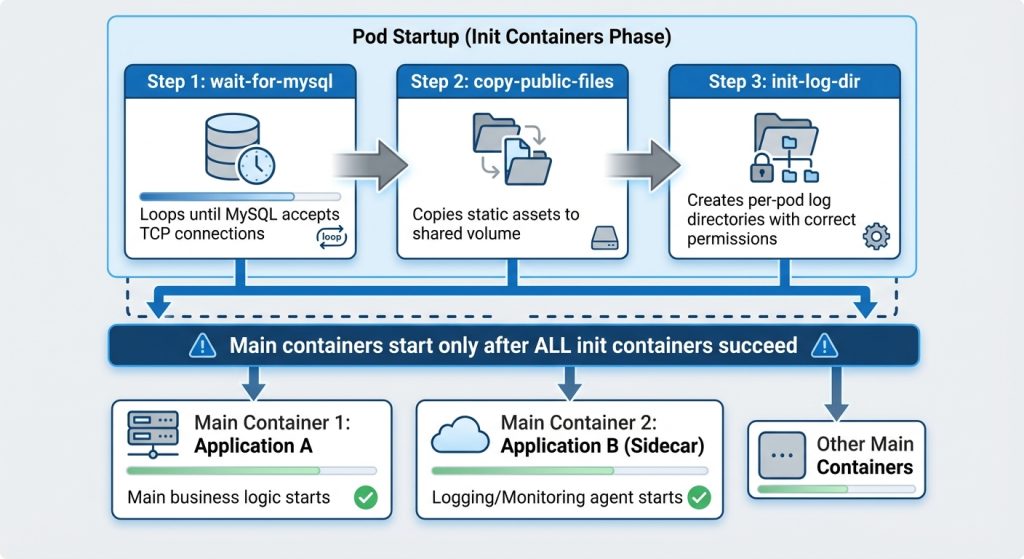
The wait-for-mysql container is intentionally simple – a BusyBox shell that runs nc -z (netcat zero-I/O mode) in a loop:
until nc -z mysql-kimai-service 3306; do
  sleep 5
doneThis ensures that even if the entire stack is deployed simultaneously (or MySQL restarts), Kimai will patiently wait rather than crash or start with incomplete initialization.
Health Probes — Startup, Readiness, and Liveness
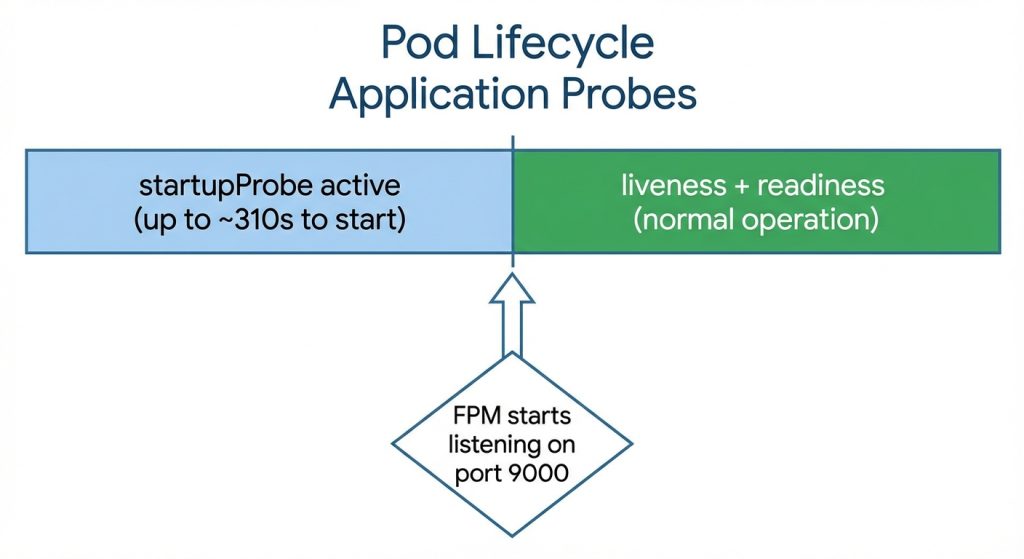
The Kimai FPM container uses all three Kubernetes probe types. This is critical because MySQL 8.4 on NFS storage took over 60 seconds to initialize, and Kimai’s own startup (migrations + cache warmup) can take up to 5 minutes.
The three-probe strategy
| Probe | Purpose | What happens on failure |
| startupProbe | Waits for FPM to finish init and listen on port 9000. Allows up to 10+(30×10)=310 seconds. | Restarts the container (but gives it plenty of time) |
| readinessProbe | Tells Kubernetes this pod is ready to receive traffic. Only runs after startup succeeds. | Pod is removed from Service endpoints — no 502 errors |
| livenessProbe | Detects if FPM has hung or died during normal operation. | Container is restarted |
The readinessProbe is what prevents 502 Bad Gateway errors. Without it, Kubernetes considers a pod ready as soon as its containers start – even if FPM is still running migrations. With 2 replicas, one pod might be ready while the other is still initializing, causing intermittent 502s for users routed to the unready pod.
Log Storage and Management
The challenge with container logs
By default, container logs exist only in the container’s filesystem. When a pod dies, restarts, or is rescheduled, all logs are lost. For a production application, this is unacceptable – you need logs to debug issues that caused the crash in the first place. My solution is not the best, but it works. I will do it better in future.
Persistent log volumes
Two dedicated PVCs (Persistent Volume Claims) store logs on NFS, surviving any pod lifecycle event:
| PVC | Stores | Mount path |
kimai-logs-pvc | Symfony application logs | /opt/kimai/var/log |
nginx-logs-pvc | Nginx access and error logs | /var/log/nginx |
Both use ReadWriteMany access mode because multiple pod replicas write simultaneously.Per-pod subdirectories with the Downward API With 2 replicas, both pods would write to the same log files on the shared PVC, causing interleaved and corrupted logs. The solution uses two Kubernetes features together:
- Downward API injects the pod’s own name as an environment variable
env:
  - name: POD_NAME
    valueFrom:
      fieldRef:
fieldPath: metadata.name # e.g., "kimai-deployment-6fd6757745-mmvmr"2. subPathExpr uses that variable to mount a unique subdirectory per pod:
volumeMounts:
- name: kimai-logs
  mountPath: /opt/kimai/var/log
subPathExpr: $(POD_NAME) # mounts PVC/<pod-name>/ → /opt/kimai/var/log/The result on the NFS volume:
kimai-logs-pvc/
├── kimai-deployment-6fd6757745-mmvmr/
│   ├── prod.log
│   └── deprecation.log
└── kimai-deployment-6fd6757745-tg9c8/
    ├── prod.log
└── deprecation.logEach pod writes to its own isolated directory. No conflicts, no interleaving.
CronJob — Automated Log Rotation
Persistent logs solve the data loss problem but introduce a new one: disk space exhaustion. Without cleanup, log files grow indefinitely until the PVC is full.
How the rotation works. A Kubernetes CronJob runs daily at 2:00 AM and processes logs in three stages:
| File age | Action |
| 0–1 days | Untouched – actively written by the application |
| 1–30 days | Compressed to .tar.gz, original deleted |
| 30+ days | Archive permanently deleted |
Secrets and Configuration Management
The deployment separates sensitive and non-sensitive configuration:
| Resource | Contains | Why |
Secret secret-kimai | DATABASE_URL, KIMAI_ADMIN_PASSWORD, APP_SECRET | Sensitive credentials — base64 encoded at rest, can be encrypted with sealed-secrets or external vault |
ConfigMap configmap-kimai | KIMAI_ADMIN_EMAIL, TRUSTED_PROXIES | Non-sensitive settings – easy to change without touching secrets |
ConfigMap configmap-nginx-kimai | Nginx default.conf | Mounted as a file into the Nginx container at /etc/nginx/conf.d/ |

Demo on my cluster (if I did not killed it for some reason) : https://kimai.novoselski.eu/
