I have a dedicated server with only 1 Public IPv4, without a router in front to manage the network. So I should use the power of iptables and proxmox to create a private network for the VMs. Virtual machines will communicate with the world through NAT. Long story short:
Internet <-> vmbr0 (default bridge with static IP) <-> vmbr2(second bridge, that I will create) <-> Virtual Machines
Proxmox Firewall, which is just iptables, will take care of network security.
Port forwarding? no worries, iptables will take care too.

Creating the bridge
Let’s get started! Our server should look like this (expand from menu Datacenter -> click on your node -> System -> Network

Click on create and choose Linux Bridge. It is crucial to leave Bridge ports empty, because we have only 1 Pubic IPv4 connected to the Network Device on the server.
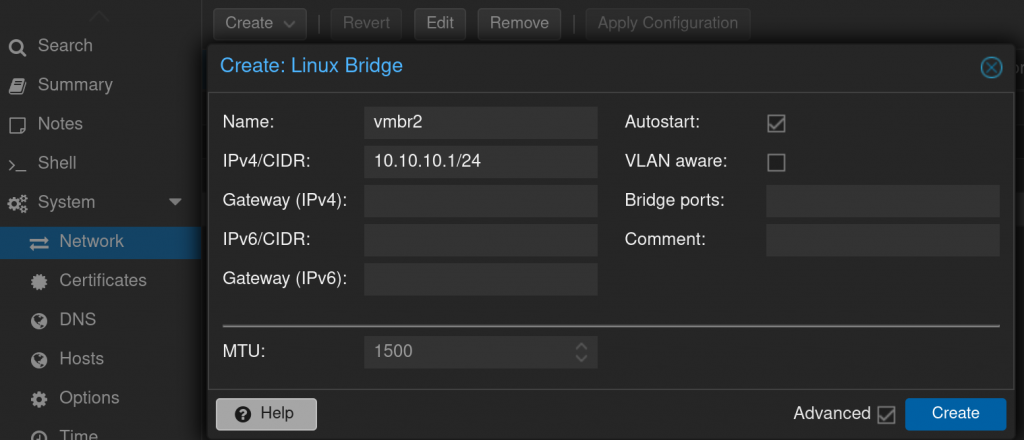
A Linux bridge is a kernel module that behaves like a network switch, forwarding packets between interfaces that are connected to it. It’s usually used for forwarding packets on routers, on gateways, or between VMs and network namespaces on a host -> read more
A network bridge is a Link Layer device which forwards traffic between networks based on MAC addresses and is therefore also referred to as a Layer 2 device -> read more
In simple words, It is like the LAN on your home router.
Take care of the routing
so, our VMs from the private subnet 10.10.10.0/24, can connect to internet.
First we need to enable IP forwarding. This is a way to make our Linux to act like a router.
SSH to the Proxmox Host or use Shell from web gui:
edit /etc/sysctl.conf with your favorite text editor and add this in the end of the file.
net.ipv4.ip_forward = 1After editing the file, you can run the following command to make the changes take effect right away.
sysctl -pConfigure the NAT with a method called MASQUERADE. In that way all virtual machines from the private network will connect to the internet from one single public IPv4.
edit the file : /etc/network/interfaces adding this under VMBR2
post-up iptables -t nat -A POSTROUTING -s '10.10.10.0/24' -o vmbr0 -j MASQUERADE
post-down iptables -t nat -D POSTROUTING -s '10.10.10.0/24' -o vmbr0 -j MASQUERADE
post-up   iptables -t raw -I PREROUTING -i fwbr+ -j CT --zone 1
post-down iptables -t raw -D PREROUTING -i fwbr+ -j CT --zone 1
The part with “post-up iptables -t raw -I PREROUTING -i fwbr+ -j CT –zone 1” is very important, because we will activate the proxmox firewall later. From the proxmox documentation:
“In some masquerade setups with firewall enabled, conntrack zones might be needed for outgoing connections. Otherwise the firewall could block outgoing connections since they will prefer the POSTROUTING of the VM bridge (and not MASQUERADE).”
The file /etc/network/interfaces should like something like this:
auto vmbr0
iface vmbr0 inet static
	address 202.202.202.202/24
	gateway 202.202.202.1
	bridge-ports eno1
	bridge-stp off
	bridge-fd 0

auto vmbr2
iface vmbr2 inet static
	address 10.10.10.1/24
	bridge-ports none
	bridge-stp off
	bridge-fd 0
        post-up   iptables -t nat -A POSTROUTING -s '10.10.10.0/24' -o vmbr0 -j MASQUERADE
        post-down iptables -t nat -D POSTROUTING -s '10.10.10.0/24' -o vmbr0 -j MASQUERADE
        post-up   iptables -t raw -I PREROUTING -i fwbr+ -j CT --zone 1
        post-down iptables -t raw -D PREROUTING -i fwbr+ -j CT --zone 1
type ifreload -a in the terminal to reload the interfaces or reboot the proxmox host.
If everything is fine, you will be able to start VMs with static IPs, that will have internet connection.
If it is not working try to add “post-up echo 1 > /proc/sys/net/ipv4/ip_forward” above the MASQUERADES rules.
Install and Configure the DHCP
We need DHCP for our VMs to take IP address automatically. For that we will use DNSMasq
apt install dnsmasq -yedit the file /etc/dnsmasq.conf and add the following in the end
domain=proxmox.local
interface=vmbr2
dhcp-range=10.10.10.10,10.10.10.220,12h
dhcp-option=vmbr2,3,10.10.10.1
server=1.1.1.1
server=8.8.8.8
dhcp-leasefile=/var/lib/misc/dnsmasq.leases
Enable and start the dnsmasq:
systemctl enable dnsmasq && systemctl start dnsmasqActivate Proxmox Firewall
Our proxmox host is with Public IP, which means that all ports are open to the world. Everybody from the internet can try to do nasty things with our hypervisor. To secure it, we will enable the built-in firewall.
Be very careful in this step, if something goes wrong you will be locked out without access to your host. If this happens, the only option will be to ask for IPMI activation to the host and remove the rules manually from the terminal.
Two ports are essential – 22 for ssh and 8006 for web-GUI. I will restrict them to be accessed only from my home static IP. My ISP never change my IP, because I am paying for it. If you do not have static IP, it is not a good idea to use dynamic IP. Maybe set a VPN, somewhere in the cloud and use it when access to proxmox is needed.
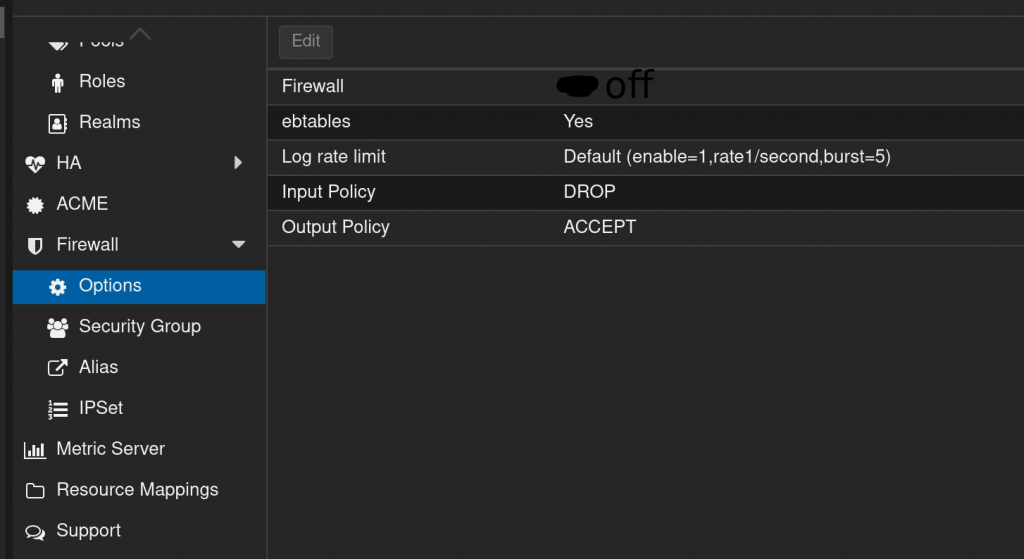
Click on Datacenter -> Expand Firewall and click options
Firewall must be off // atleast for now
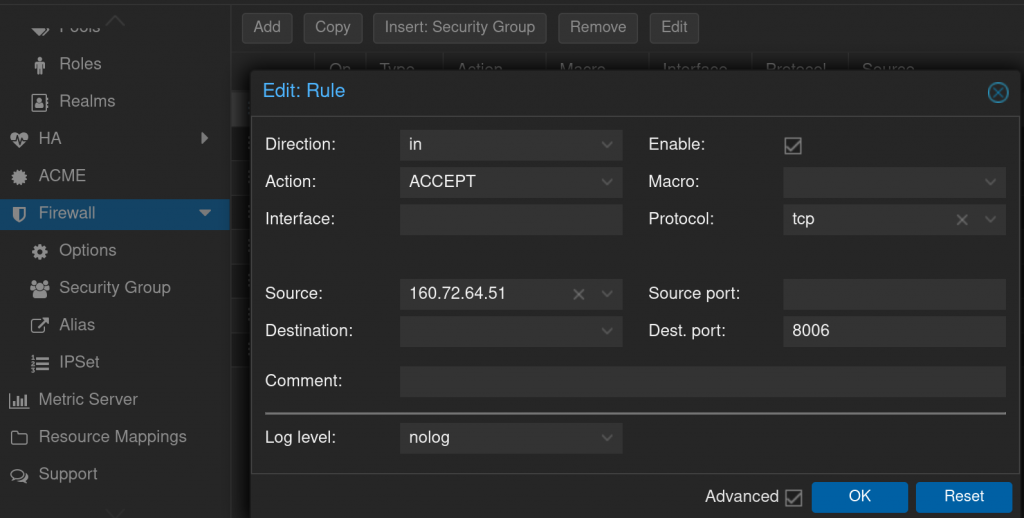
Click on Firewall -> Add | to make some firewall rules | 160.72.64.51 is my home IP (not really but..) and 8006 is the port for Proxmox web
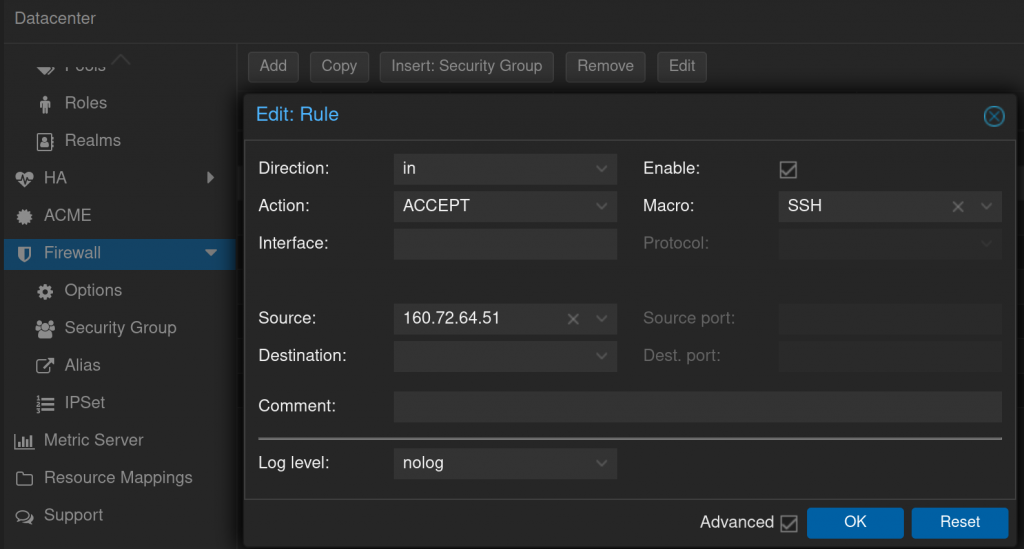
Do the same but for SSH
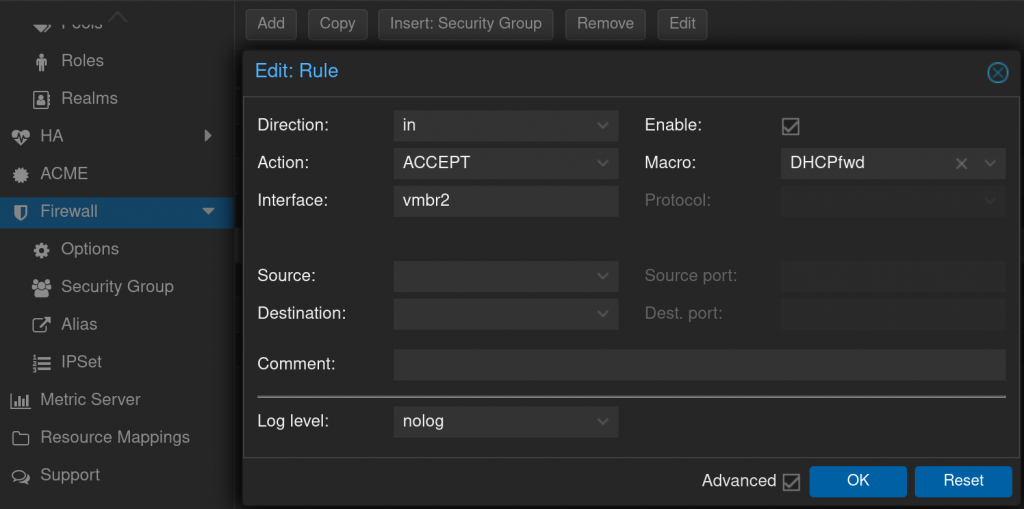
It took me some time to understand why my DHCP is not working, ufc it was the f#**ing firewall, add this rules for VMBR2 interface
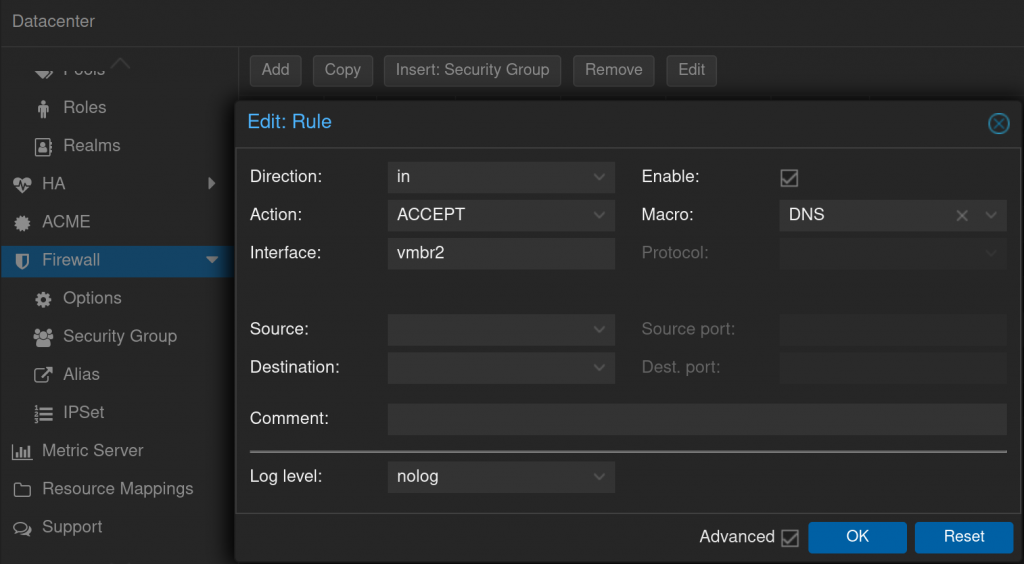
…and rule for DNS (DHCP needs it)
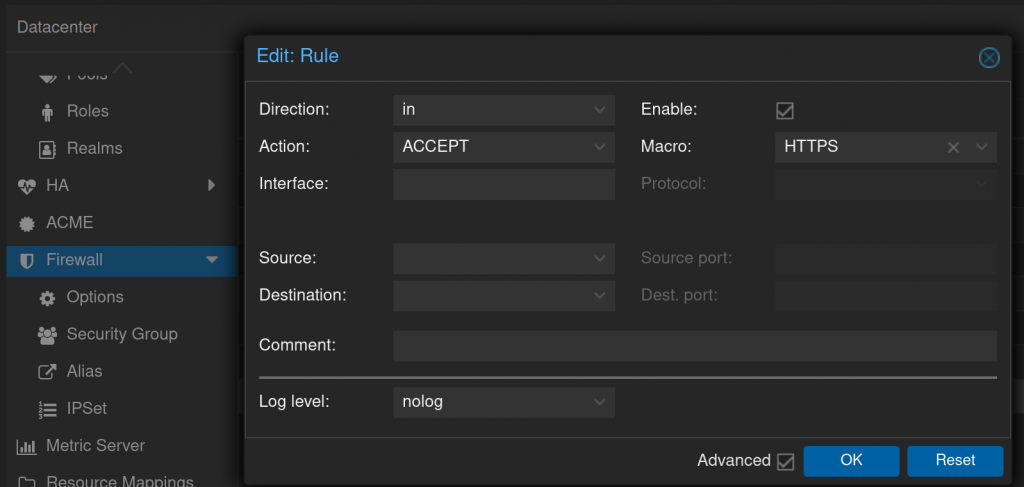
I will allow and the https traffic, because I will port forward port 443 to my webserver from private subnet. Every time you create a port forwarding, it is needed to create a rule in the firewall!
Return to the menu Firewall -> Options and Enable the firewall. If everything is ok, you and only you, will have access to the proxmox administration. Nice tool to test for open ports.
Port forwarding to VM
add at the end of the file /etc/network/interfaces where 10.10.10.200 is the webserver
post-up iptables -t nat -A PREROUTING -i vmbr0 -p tcp --dport 443 -j DNAT --to-destination 10.10.10.200:443
post-down iptables -t nat -D PREROUTING -i vmbr0 -p tcp --dport 443 -j DNAT --to-destination 10.10.10.200:443
the file final /etc/network/interfaces should look like this
auto lo
iface lo inet loopback

iface eno1 inet manual

iface eno2 inet manual

auto vmbr0
iface vmbr0 inet static
	address 202.202.202.202/24
	gateway 202.202.202.1
	bridge-ports eno1
	bridge-stp off
	bridge-fd 0

auto vmbr2
iface vmbr2 inet static
	address 10.10.10.1/24
	bridge-ports none
	bridge-stp off
	bridge-fd 0
        post-up   iptables -t nat -A POSTROUTING -s '10.10.10.0/24' -o vmbr0 -j MASQUERADE
        post-down iptables -t nat -D POSTROUTING -s '10.10.10.0/24' -o vmbr0 -j MASQUERADE
        post-up   iptables -t raw -I PREROUTING -i fwbr+ -j CT --zone 1
        post-down iptables -t raw -D PREROUTING -i fwbr+ -j CT --zone 1
######## open port 443 to the world
        post-up iptables -t nat -A PREROUTING -i vmbr0 -p tcp --dport 443 -j DNAT --to-destination 10.10.10.200:443
        post-down iptables -t nat -D PREROUTING -i vmbr0 -p tcp --dport 443 -j DNAT --to-destination 10.10.10.200:443
“ifreload -a” to activate the changes.
And that should be it.
Enjoy!

I also have a single public IPv4 on Proxmox and want to NAT my VMs. I’ll try creating vmbr2 with no bridge ports, set net.ipv4.ip_forward=1, and use iptables for port forwarding; how are you structuring DNAT/SNAT rules for specific VMs on 10.10.10.0/24?