I have an on-premise Kubernetes cluster with persistent storage. Now it’s time to find a way to expose my applications to the internet.
I only have a single public IPv4 address and a /24 private subnet behind NAT, managed by OPNsense. This means I’ll need a few creative (and slightly dirty) hacks to make everything work.
I’m starting to realize how much the cloud has spoiled me. Without unlimited load balancers and public IP addresses, things quickly become a bit more complex.
For this setup, my main tools will be MetalLB and NGINX Ingress. NGINX Ingress will be retired soon, and I plan to replace it in the near future. However, for a home lab environment it will work just fine for now.
This setup is far from perfect, so don’t try this in real production.
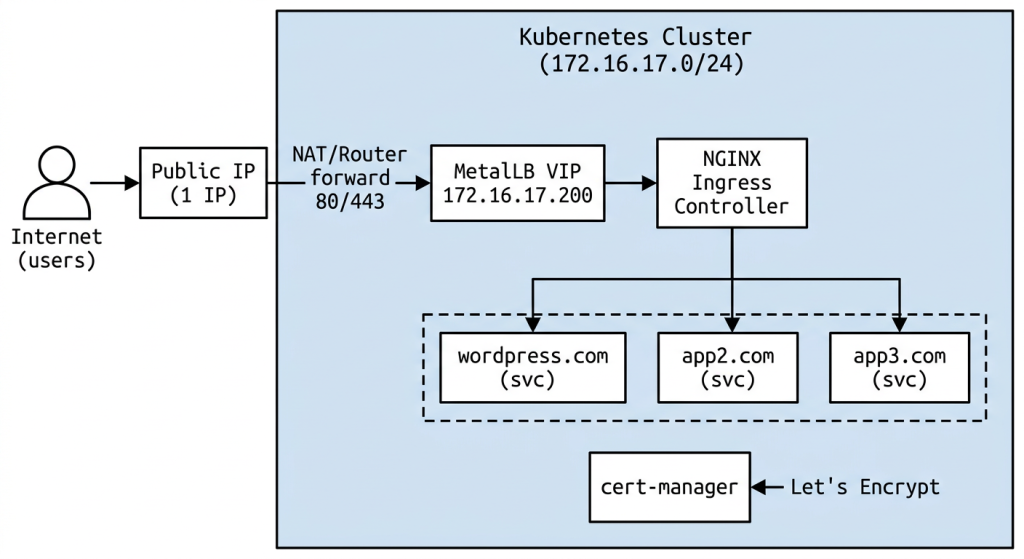
Traffic Flow Summary:
User visits https://blog.yourdomain.comDNS resolves to your PUBLIC IPRouter/NAT forwards :443 → 172.16.17.200:443 (MetalLB Virtual IP)MetalLB delivers to NGINX Ingress Controller podIngress Controller matches Host: blog.yourdomain.comTerminates TLS (cert from cert-manager/Let's Encrypt)Proxies plain HTTP to wordpress-svc:80Service routes to a WordPress pod(ClusterIP Service)
Why just do not install ngnix ingress controller and connect it with ClusterIp service ? Why I need MetalLB?

The Ingress Controller is just a pod inside your cluster. Pods get internal IPs like 10.244.x.x that nobody outside the cluster can reach. MetalLB gives the Ingress Controller a real IP on your network(node network 172.16.17.0/24) that external machines can reach. MetalLB is NOT a load balancer like AWS application load balancer. It just assigns an IP address. The NGINX Ingress Controller does ALL the real work — it is my load balancer and NGINX in one. The name “MetalLB” is misleading. It’s really just “MetalIP” — it makes a virtual IP exist on my bare-metal network. Nothing more.
- You install MetalLB
→ It watches for Services of type LoadBalancer
→ It has a pool: 172.16.17.200-172.16.17.210 - You install NGINX Ingress Controller
→ It creates a Service of type LoadBalancer
→ Kubernetes says: “I need an external IP for this Service” - MetalLB sees the request
→ Assigns 172.16.17.200 from its pool
→ Starts answering ARP: “I own 172.16.17.200” - Traffic to 172.16.17.200:80
→ MetalLB directs it to the Service
→ Service forwards to NGINX Ingress pod
→ NGINX reads Host header, routes to app
They Don’t Know About Each Other!
My cluster uses Calico for CNI. Before starting make sure it will not interfere with MetalLB
kubectl -n kube-system get configmap kube-proxy -o yaml | grep modeIf it returns mode: "" or mode: "iptables", you’re fine.
Installing MetalLB with Helm
helm repo add metallb https://metallb.github.io/metallb
helm repo update

helm install metallb metallb/metallb \
  --namespace metallb-system \
  --create-namespace \
  --wait
Verify all pods are running:
kubectl -n metallb-system get podsexpected result
NAME                                  READY   STATUS    RESTARTS   AGE
metallb-controller-xxxxxxxxx-xxxxx    1/1     Running   0          30s
metallb-speaker-xxxxx                 1/1     Running   0          30s
metallb-speaker-xxxxx 1/1 Running 0 30sConfigure IP Pool and L2 Advertisement. Create metallb.yaml
apiVersion: metallb.io/v1beta1
kind: IPAddressPool
metadata:
  name: default-pool
  namespace: metallb-system
spec:
  addresses:
    - 172.16.17.210-172.16.17.230
---
apiVersion: metallb.io/v1beta1
kind: L2Advertisement
metadata:
  name: default
  namespace: metallb-system
spec:
  ipAddressPools:
    - default-pool
kubectl apply -f metallb.yamlVerify Everything:
kubectl -n metallb-system get ipaddresspool
kubectl -n metallb-system get l2advertisementQuick Test. Create a throwaway LoadBalancer service to confirm MetalLB assigns an IP:
kubectl create deployment nginx-test --image=nginx
kubectl expose deployment nginx-test --port=80 --type=LoadBalancer
kubectl get svc nginx-testYou should see:
NAME         TYPE           CLUSTER-IP      EXTERNAL-IP      PORT(S)        AGE
nginx-test LoadBalancer 10.96.xxx.xxx 172.16.17.200 80:3xxxx/TCP 10sTest it from any machine on your 172.16.17.0/24 network:
curl http://172.16.17.200Clean up the test
kubectl delete deployment nginx-test
kubectl delete svc nginx-testOnce MetalLB is confirmed working, the next step is installing the NGINX Ingress Controller — it will automatically get the next available IP from MetalLB (172.16.17.200).
Installing NGINX Ingress Controller
helm repo add ingress-nginx https://kubernetes.github.io/ingress-nginx
helm repo update

helm install ingress-nginx ingress-nginx/ingress-nginx \
  --namespace ingress-nginx \
  --create-namespace \
--waitVerify It Got a MetalLB IP
kubectl -n ingress-nginx get svc ingress-nginx-controllerExpected output:
NAME                       TYPE           CLUSTER-IP      EXTERNAL-IP      PORT(S)                      AGE
ingress-nginx-controller LoadBalancer 10.96.xxx.xxx 172.16.17.210 80:3xxxx/TCP,443:3xxxx/TCP 30sQuick Test
curl http://172.16.17.210You should get a 404 page from nginx
<html>
<head><title>404 Not Found</title></head>
<body>
<center><h1>404 Not Found</h1></center>
<hr><center>nginx</center>
</body>
</html>Port forwarding Public IP to metalLB private IP
Now I have MetalLB and Ingress in my cluster. Ingress is exposed to 172.16.17.210 which is from node subnet. Now I will port-forward 443/80 ports from my Public Ip to 172.16.17.210.
While you are still logged in to opnsense – Find the NAT Reflection section and set
Firewall → Settings → Advanced
Reflection for port forwards: Enable (Pure NAT)
Reflection for 1:1: Enable
Automatic outbound NAT for Reflection: Checked
This will fix hairpin NAT problem. The cluster can’t reach itself via its own public IP, which is important for cert creation later!
DNS record pointing to Public IP
Create A record in your DNS panel
Expose app to the internet. HTTP only for now
I already have a deployment. It is not described here but it has this selectors (app: wordpress). I need two more things: a Service and an Ingress.
ClusterIP Service
# wordpress-svc.yaml
apiVersion: v1
kind: Service
metadata:
  name: wordpress-svc
spec:
  selector:
    app: wordpress       # ← matches your pod labels
  ports:
    - port: 80
      targetPort: 80
type: ClusterIPkubectl apply -f wordpress-svc.yamlVerify it sees your pods:
kubectl get endpoints wordpress-svcIngress Resource
# wordpress-ingress.yaml
apiVersion: networking.k8s.io/v1
kind: Ingress
metadata:
  name: wordpress-ingress
spec:
  ingressClassName: nginx
  rules:
    - host: wordpress.novoselski.eu           # ← replace with your actual domain
      http:
        paths:
          - path: /
            pathType: Prefix
            backend:
              service:
                name: wordpress-svc
                port:
number: 80kubectl apply -f wordpress-ingress.yamlVerify
kubectl get ingress wordpress-ingressExpected
NAME                CLASS   HOSTS            ADDRESS          PORTS   AGE
wordpress-ingress nginx yourdomain.com 172.16.17.210 80 10sLet’s test with one more deployment. A simple Apache. I will point apache.novoselski.eu domain to the same public IP
# apache-deployment.yaml
apiVersion: apps/v1
kind: Deployment
metadata:
  name: apache
  labels:
    app: apache
spec:
  replicas: 2
  selector:
    matchLabels:
      app: apache
  template:
    metadata:
      labels:
        app: apache
    spec:
      containers:
      - name: httpd
        image: httpd:latest
        ports:
        - containerPort: 80
# apache-service.yaml
apiVersion: v1
kind: Service
metadata:
name: apache
spec:
selector:
app: apache
ports:
- port: 80
targetPort: 80# apache-ingress.yaml
apiVersion: networking.k8s.io/v1
kind: Ingress
metadata:
name: apache-ingress
spec:
ingressClassName: nginx
rules:
- host: apache.novoselski.eu
http:
paths:
- path: /
pathType: Prefix
backend:
service:
name: apache
port:
number: 80Apply all:
kubectl apply -f apache-deployment.yaml
kubectl apply -f apache-service.yaml
kubectl apply -f apache-ingress.yamlVerify:
kubectl get pods -l app=apache
kubectl get ingress apache-ingressIt works. MetalLB gives me ONE IP. NGINX Ingress multiplexes MANY domains on that ONE IP.
Move to HTTPS with cert-manager
Install cert-manager
kubectl apply -f https://github.com/cert-manager/cert-manager/releases/latest/download/cert-manager.yamlWait for it:
kubectl get pods -n cert-manager -wAll 3 pods should be Running before continuing.
Create ClusterIssuer (Let’s Encrypt)
# clusterissuer.yaml
apiVersion: cert-manager.io/v1
kind: ClusterIssuer
metadata:
  name: letsencrypt-prod
spec:
  acme:
    server: https://acme-v02.api.letsencrypt.org/directory
    email: your-email@novoselski.eu
    privateKeySecretRef:
      name: letsencrypt-prod
    solvers:
    - http01:
        ingress:
class: nginxkubectl apply -f clusterissuer.yamlUpdate your existing Ingresses apache-ingress.yaml and wordpress-ingress.yaml
# apache-ingress.yaml
apiVersion: networking.k8s.io/v1
kind: Ingress
metadata:
  name: apache-ingress
  annotations:
    cert-manager.io/cluster-issuer: letsencrypt-prod
    nginx.ingress.kubernetes.io/ssl-redirect: "true"    # force https
spec:
  ingressClassName: nginx
  tls:
  - hosts:
    - apache.novoselski.eu
    secretName: apache-tls
  rules:
  - host: apache.novoselski.eu
    http:
      paths:
      - path: /
        pathType: Prefix
        backend:
          service:
            name: apache
            port:
              number: 80
# wordpress-ingress.yaml
apiVersion: networking.k8s.io/v1
kind: Ingress
metadata:
name: wordpress-ingress
annotations:
cert-manager.io/cluster-issuer: letsencrypt-prod
nginx.ingress.kubernetes.io/ssl-redirect: "true" # force https
spec:
ingressClassName: nginx
tls:
- hosts:
- wordpress.novoselski.eu
secretName: wordpress-tls
rules:
- host: wordpress.novoselski.eu
http:
paths:
- path: /
pathType: Prefix
backend:
service:
name: wordpress
port:
number: 80kubectl apply -f apache-ingress.yaml
kubectl apply -f wordpress-ingress.yamlcheck the result. It will take 1-2 min before ready
kubectl get certificates
kubectl get certificaterequests
kubectl get challengesexpecting
NAME             READY   SECRET
apache-tls       True    apache-tls
wordpress-tls    True    wordpress-tls